Hardware Monitor
See resource usage for the class and a hardware inventory for each computer.
Open it from: top toolbar > System Management > Hardware Monitor
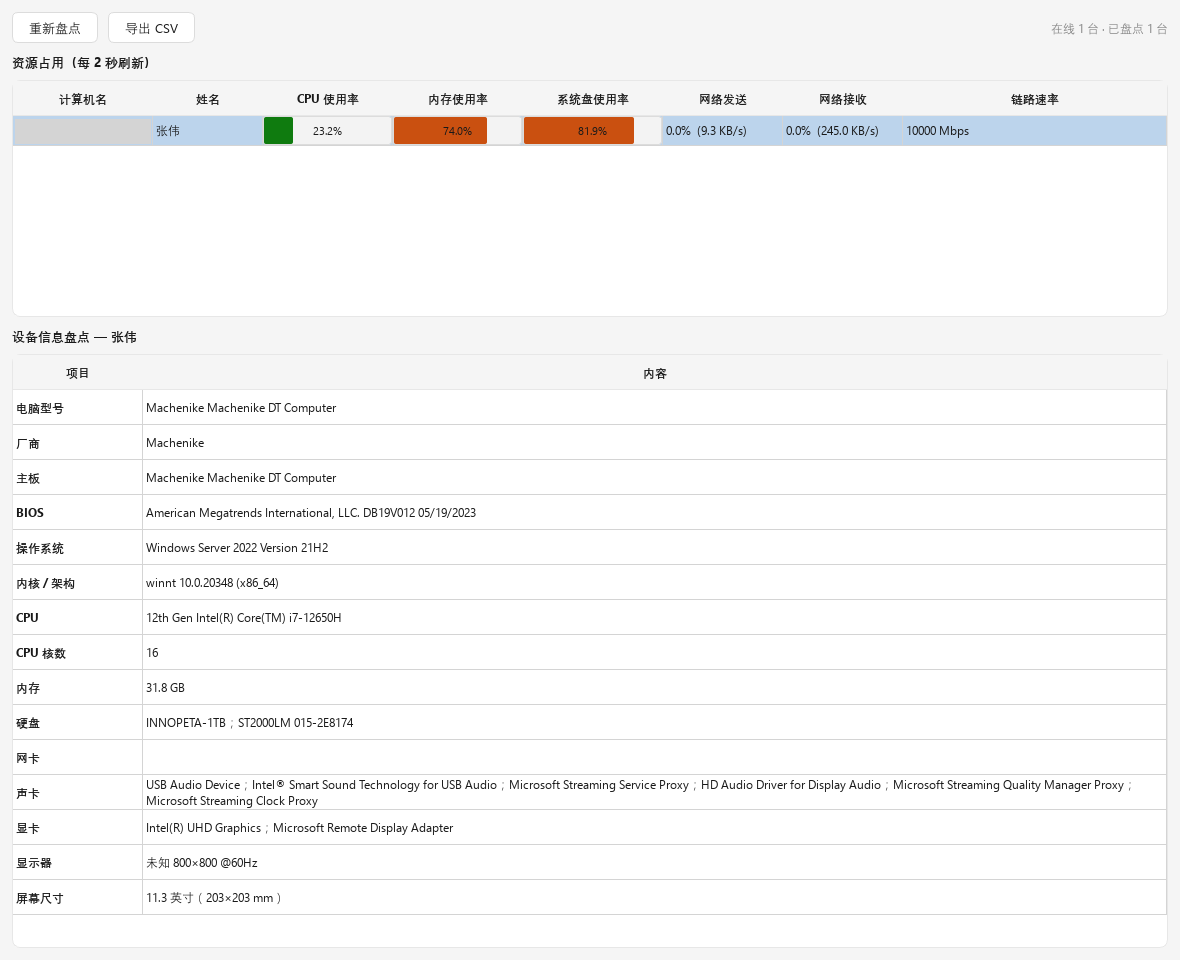
Live usage
Each online computer refreshes every 2 seconds:
| Column | Description |
|---|---|
| CPU | Usage |
| Memory | Usage |
| System disk | Usage |
| Network | Usage, speed, and link rate |
Bars turn orange at 70% and red at 90%.
Reporting stops when closed
Computers report usage only while this window is open. The first values may take 2 to 4 seconds.
Hardware inventory
Select a computer to see its model, manufacturer, motherboard, BIOS, OS, kernel and architecture, CPU, cores, memory, disks, network adapters, audio, graphics, display, and screen size.
Select Scan Again after hardware changes.
Export
Select Export CSV to save the class inventory for asset records.
"Collecting..."
Common causes:
- The student app is too old.
- The computer just connected.
- The connection is unstable. See the FAQ.