Exam Papers and Review
Manage saved exams and send question-by-question review to students after they submit.
Open it from: left navigation > Exam Management > Question Bank > Exam Papers
Manage exams
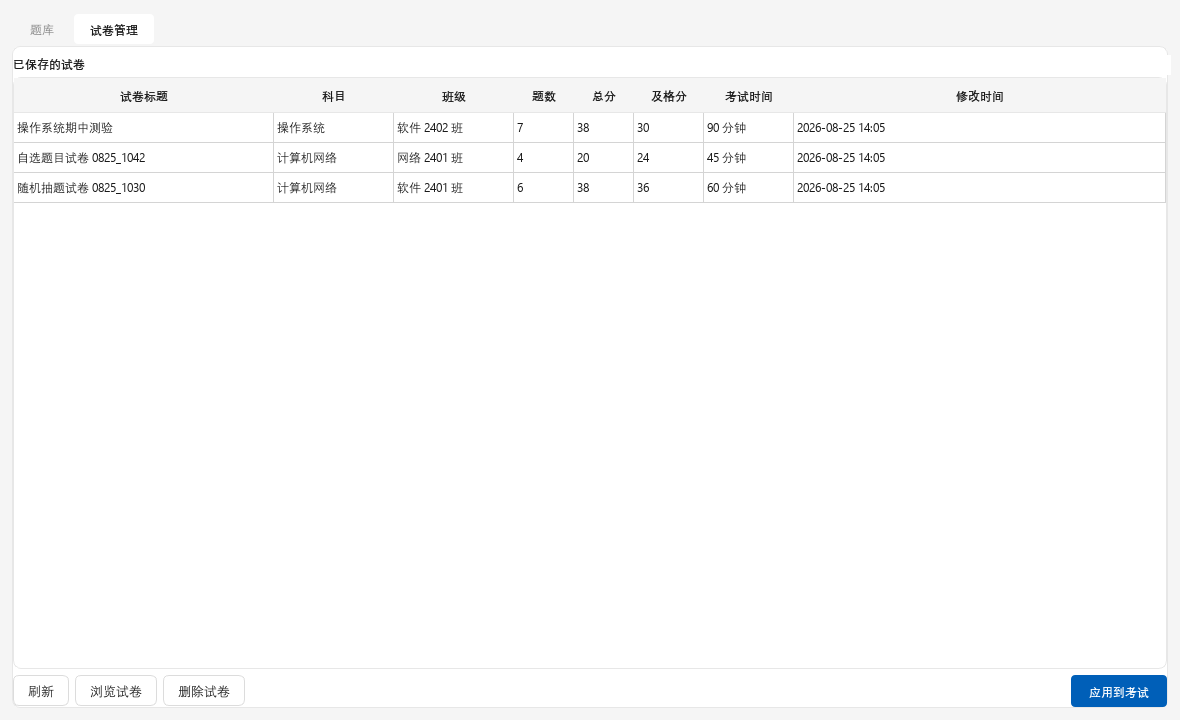
The list shows title, subject, class, questions, total, passing score, duration, and last modified date.
| Button | What it does |
|---|---|
| Preview | Shows the questions and correct answers |
| Delete | Removes the exam |
| Apply to Exam | Makes it the current exam |
After applying it, go to Online Exams and select Start Exam or Mandatory Exam.
Exams are stored in the papers folder of the user data directory.
Student review
After submitting, students can see:
- Score, total, and pass or fail
- Each question's type, points, their answer, and the correct answer
- Pending manual grading for essays and manually graded blanks
Correct answers are not sent with the exam, so they cannot be found on the student computer before submission.
Close the exam immediately after submission
Turn off Show score on submission and Allow review in the exam properties.