How to Optimize Desktop Push Efficiency
Within the same group, slow transfers are usually caused by the following situations:
| Cause | Description | Recommendation |
|---|---|---|
| Inconsistent terminal speeds | When transferring the same task, if both 100M and 1000M terminals are present, they are automatically split into two groups for transfer. The more tasks are split, the lower the overall transfer efficiency, because the bandwidth from the group to the server is generally limited (typically 1G), and each transfer task runs independently and consumes a portion of that bandwidth. | Software default limit: each group allows at most two transfer tasks; beyond that, tasks wait; the global maximum is 9, and tasks exceeding the global limit also wait. |
| No network detection done | Without fine-grained network detection, computers under Switch 1 and Switch 2 may transfer across each other. If the two switches are only cascaded at 1G, cross-switch transfers consume the cascade bandwidth and reduce speed. For example, Switch 1 has computers 1–5 and Switch 2 has 6–10; when 1 connects to 6 and 2 connects to 7, all transfers go over the cascade bandwidth, naturally lowering efficiency. | 1. First run network detection to obtain the basic structure; 2. Manually adjust the detection results. |
| Inconsistent client tasks | When the transfer tasks differ, the bandwidth to the server is divided among them. | Try to have terminals in the same group run the same task. |
| IP conflict | An IP conflict may cause some computers to always show a speed of 0. | Internal logic handles this; when it cannot be resolved, you need to investigate and fix the root cause of the IP conflict. |
1. Adjusting Distribution Settings
Go to Desktop -> Desktop management, select a group, and click the Distribute Desktop dropdown menu in the toolbar.
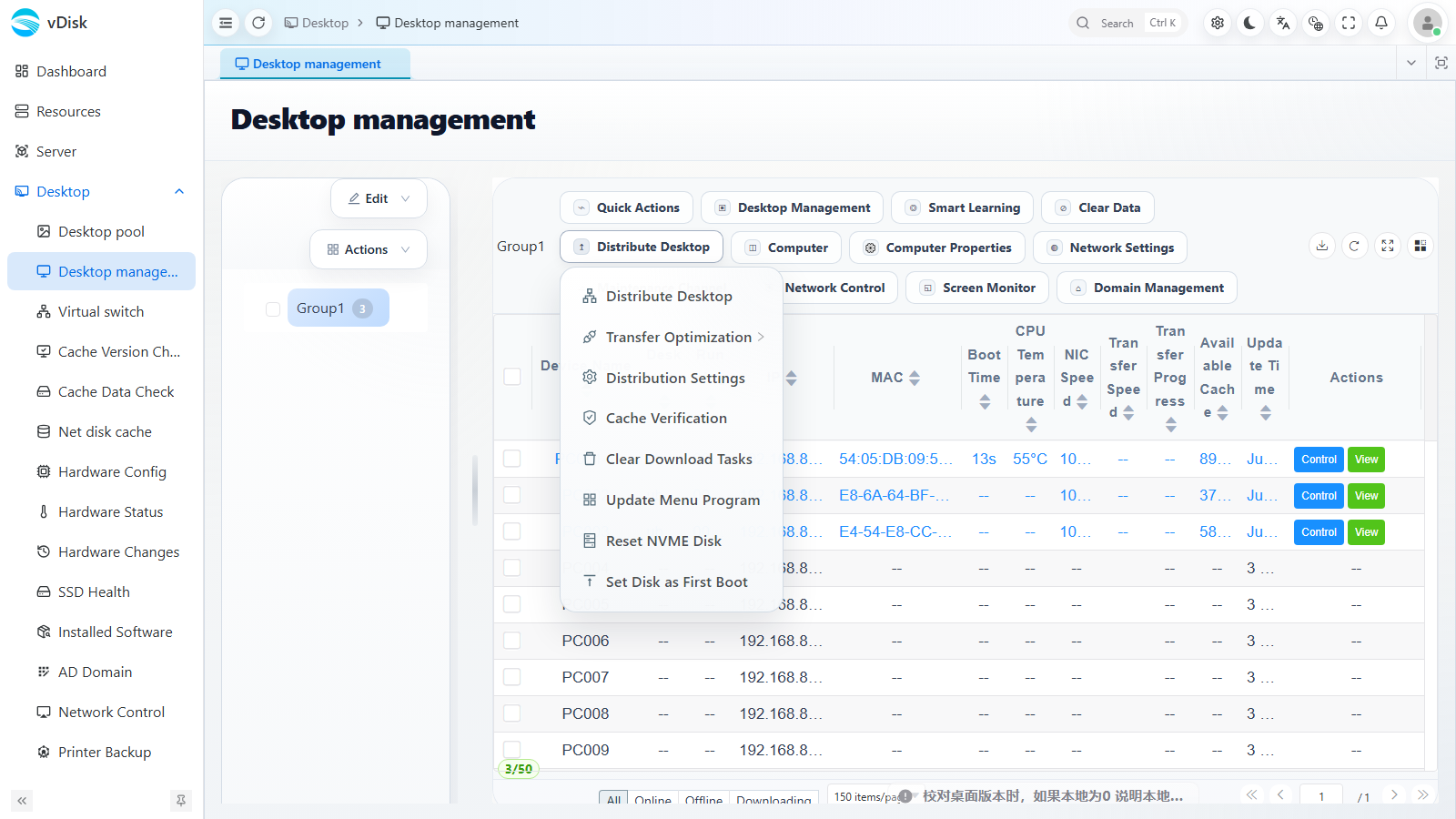
The menu provides operations such as Distribute Desktop, Transfer Optimization, Distribution Settings, Cache Optimization, and Update Menu Program.
Click Distribution Settings; in the drawer you can adjust download behavior by scenario:
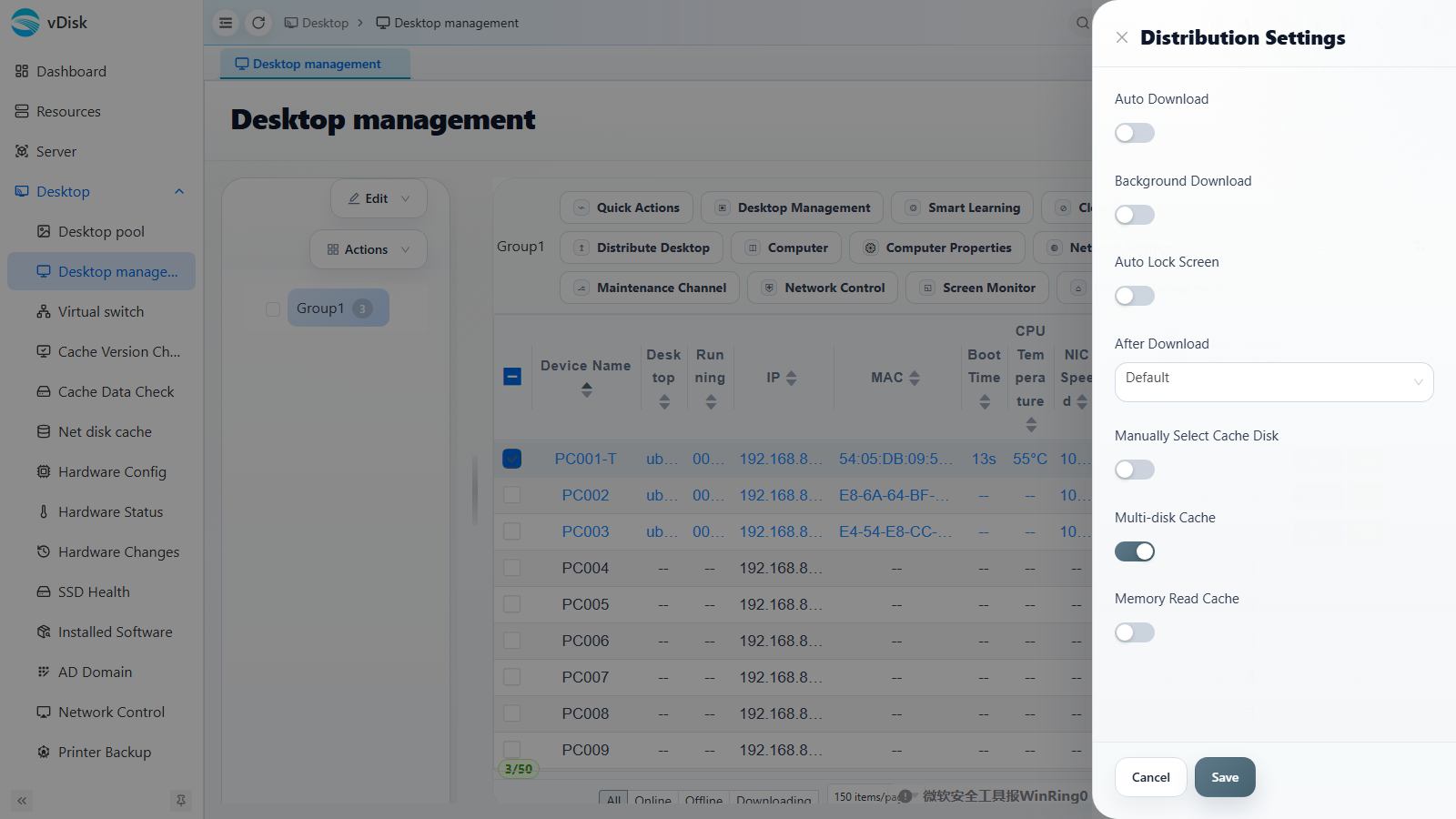
- Auto Download: The terminal automatically begins downloading the desktop after coming online.
- Background Download: Silently downloads in the background while the user is working, reducing waiting.
- Auto Lock Screen: Locks the screen during download to avoid accidental operations.
- After Download: The default action after the download completes.
- Manually Select Cache Disk: With multiple disks, manually specify where the cache lands.
- Multi-disk Cache: Allows multiple disks to share the cache, improving throughput.
- Memory Read Cache: Uses memory to accelerate reads of hot data.
2. Transfer Optimization and Network Detection
Go to Desktop -> Virtual switch, or click Transfer Optimization in the Distribute Desktop menu above.
1) Network detection
2) Move virtual switch groups
- Ensure all computers in the group are online.
- Identify which is the main switch (connected to the uplink fiber module); the other switches are cascaded to this main switch.
- Shut down one secondary switch; some computers will go offline — these are on the switch that was shut down. Move them to a switch group (Distribute Desktop -> Transfer Optimization -> Move Virtual Switch Group).
- Following step 3, separate out the other switch groups one by one.
- Finally handle the main switch: shut down all switches except the main switch; the computers still online are on the main switch — move them to a group.